
Whether you have shared hosting or a VPS/dedicated server with cPanel, you must configure your email client with the following details:
| Field | Value |
|---|---|
| Server | mail.yourdomain.com |
| Username | Your full email address |
| Password | The one you set when creating the email account in cPanel |
To make sure your username and password are correct, try logging into webmail at https://yourdomain.com/webmail. If you do not remember your password, you can reset it from cPanel as explained in this guide.
Port configuration
STARTTLS configuration
| Setting | Value |
|---|---|
| Security encryption | STARTTLS |
| Authentication method | Normal password |
| IMAP port | 143 |
| POP port | 110 |
| SMTP port | 587 |
Alternative SSL/TLS configuration
| Setting | Value |
|---|---|
| Security encryption | SSL/TLS |
| Authentication method | Normal password |
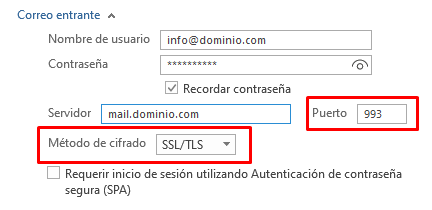
| IMAP port | 993 |
| POP port | 995 |
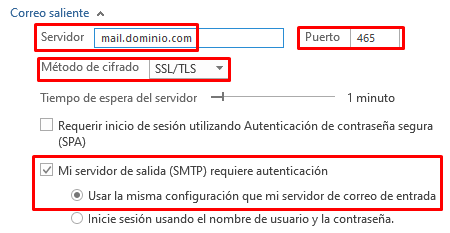
| SMTP port | 465 |
We recommend always using IMAP instead of POP: IMAP keeps your folders in sync across all your devices, while POP downloads messages to a single device.
How to set up Outlook
Incoming IMAP mail:
Outgoing SMTP mail:
Having connection problems?
- The SMTP server only allows SSL TLS 1.2 / 1.3 connections, since older SSL versions are vulnerable.
- If you use Windows and Outlook, you need at least Windows 10 and Outlook 2016: older versions are not compatible.
- If you use macOS, you need at least version 10.12 (Sierra): older versions are not compatible.
- As an alternative to upgrading your operating system, you can switch email clients. We recommend Mozilla Thunderbird.